
If you’ve been researching live streaming equipment, video production gear, or studio cameras, you’ve probably come across the term PTZ security system camera.
At first glance, it sounds technical. But the idea itself is simple.
A single PTZ camera is designed to move remotely without needing someone behind the camera. That one difference can completely change how a stream, podcast, presentation, or event is produced.
For some setups, it is unnecessary. For others, it removes one of the biggest challenges in creating professional-looking video.
Here’s what PTZ cameras actually do, where they make sense, and what to consider before buying one.
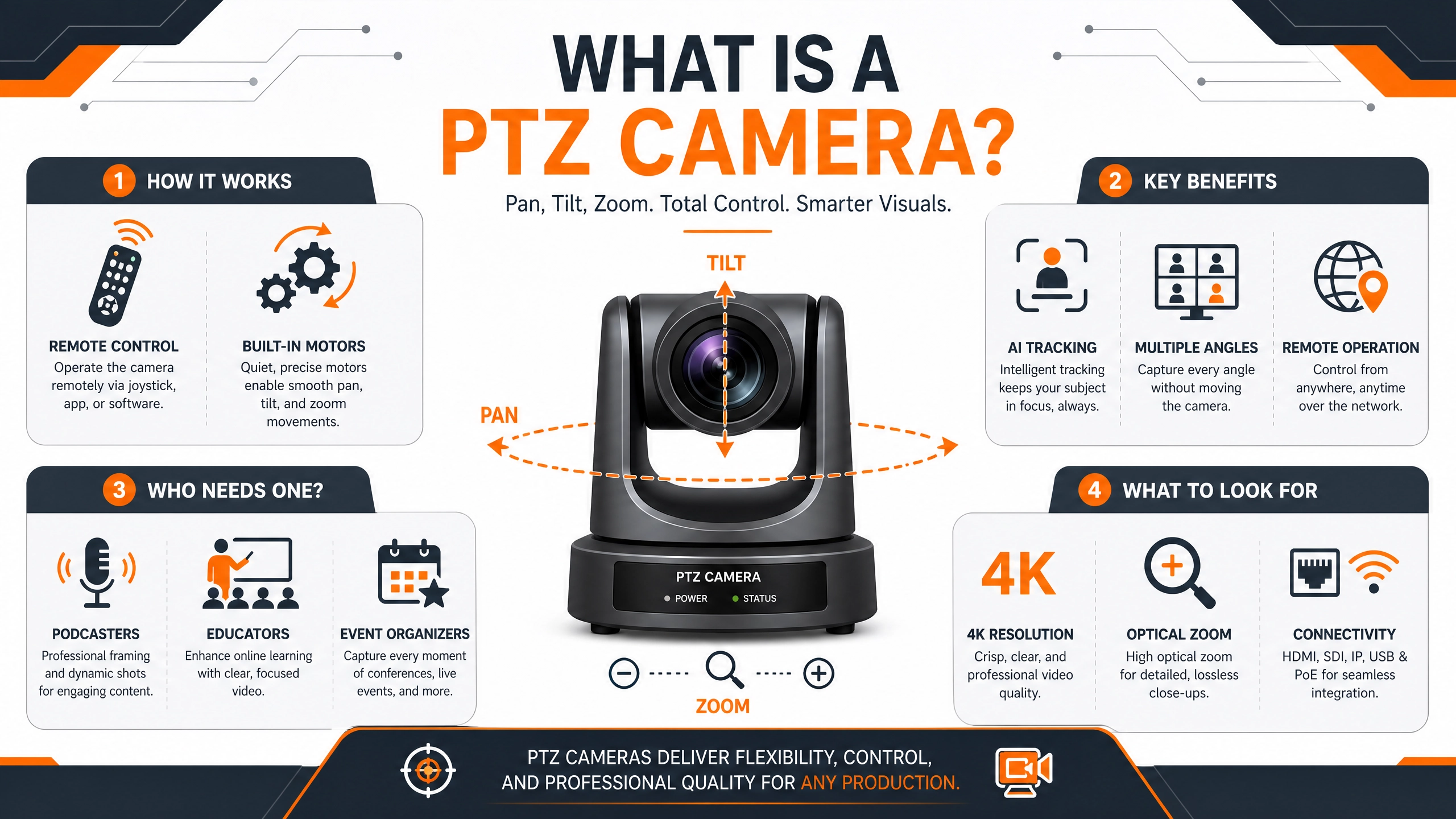
What Does PTZ Mean?
PTZ stands for:
- Pan — moving left and right
- Tilt — moving up and down
- Zoom — getting closer to the subject using optical zoom
Unlike a standard webcam or fixed camera, these movements are motorized and controlled remotely, especially in dynamic environments.
Instead of physically adjusting the camera every time you move, you can control framing from flexible coverage through:
- Software on your computer
- A remote controller
- A smartphone app
- Streaming software
- Network controls
Some newer models can even follow movement automatically.
That means the camera adapts while you focus on presenting, teaching, streaming, or recording.
How Does a PTZ Camera Work?
A PTZ camera sits in a fixed location such as:
- A desk
- Wall mount
- Ceiling mount
- Tripod
- Studio rig
The camera itself stays in place, but internal motors move the lens and camera head based on your commands. Here are some key features of PTZ cameras.
Modern PTZ cameras can also include features such as:
- AI-powered subject tracking
- Preset camera positions
- Gesture controls
- Wireless connectivity
- Multi-camera integration
For solo creators and smaller production teams, this can remove a surprising amount of manual work.
Why Would Someone Use a PTZ Camera?
The biggest advantage is flexibility.
You get multiple framing options without needing someone physically operating the camera.
Live Streaming
You may start sitting at a desk, then stand up to demonstrate something.
Instead of being locked into one angle, the camera follows or reframes automatically.
Podcasts
Conversations rarely stay perfectly still.
A PTZ camera allows smooth adjustments between speakers without interrupting the flow.
Presentations and Teaching
Teachers, trainers, and presenters often move between:
- Whiteboards
- Screens
- Tables
- Demonstration areas
Remote movement keeps the framing natural.
Events and Community Spaces
Many places now stream events regularly, including:
- Houses of worship
- Schools
- Community centers
- Corporate events
- Conferences
A ceiling-mounted PTZ camera can cover an entire space without requiring a dedicated camera operator.
PTZ Camera vs Action Camera vs Gimbal
These categories sometimes get grouped together, but they solve different problems for homeowners, including managing blind spots in security systems.
| Device | Best For | Main Purpose |
|---|---|---|
| PTZ Camera | Streaming, events, presentations | Remote camera movement |
| Action Camera | Travel, vlogging, movement | Portable recording |
| Gimbal | A PTZ camera stays fixed and moves its lenses remotely. | Stabilization while walking |
An action camera moves because you carry it.
A gimbal stabilizes movement while someone holds it.
A PTZ camera stays fixed and moves remotely.
The difference matters because buying the wrong tool usually creates frustration later.
Who Benefits Most From PTZ Cameras?
PTZ cameras are usually most valuable when one person needs to do the work of several people.
Typical users include:
Solo Content Creators
Multiple camera angles can create a more polished production without needing extra help.
Podcasters
Long-form video becomes more dynamic with adjustable framing.
Small Production Teams
Remote control reduces workload during live productions.
Educators and Trainers
Presenters can move naturally while keeping the audience visually engaged.
Community Organizations and Houses of Worship
Remote operation helps cover events efficiently without additional staff.
What Should You Look For Before Buying?
Not every PTZ camera fits every setup.
A few specifications usually matter more than others.
Resolution
For modern content creation:
- 1080p should be considered the starting point
- 4K provides more flexibility for editing and cropping
- Higher resolution can help future-proof your setup
AI Tracking
AI tracking can be one of the most useful upgrades for solo creators.
The camera identifies and follows a subject automatically.
This becomes valuable if you:
- Teach
- Present
- Demonstrate products
- Move around frequently on camera
Connectivity
Think about how the camera will connect to your workflow.
Common options include:
- USB-C
- HDMI
- NDI
- Wi-Fi
- Ethernet
For simpler desktop setups, USB often works well.
Larger productions usually benefit from network-based options.
Optical Zoom
Optical zoom matters more than digital zoom.
Digital zoom simply crops the image.
Optical zoom uses physical lens movement and maintains image quality.
As a rough guide:
- Small rooms: 4x–5x
- Medium rooms: 10x–12x
- Large venues: 12x and above
Size and Mounting
Some PTZ cameras are built for large venues.
Others fit naturally on a desk or monitor.
Choosing a camera that fits your environment often matters more than choosing the largest model available.
Are PTZ Cameras Worth It?
The answer depends less on budget and more on how you create content.
If you’re a streamer who games at a desk and your face cam is a fixed webcam or action camera, you probably don’t need a PTZ camera yet. A good USB webcam handles that job well and costs less.
If you mostly sit at a desk using a webcam for gaming or meetings, a PTZ camera may not add much value.
If your content involves movement across different areas, presentations, events, or compact multi-angle production, it can remove limitations that become noticeable very quickly.
If you want to compare it against a standard streaming camera before deciding, the Streaming Camera section at Yaya is worth checking too. But if you need the camera to move with you — PTZ is the answer.
For many creators and small teams, the appeal isn’t just camera movement.
It’s reducing complexity.
One device can handle tasks that previously required another person behind the camera.
Frequently Asked Questions
Can a PTZ camera be used as a webcam?
Yes. Many modern PTZ cameras connect through USB and function like a standard webcam.
Are PTZ cameras good for live streaming?
Yes. They are commonly used for streaming because they allow remote framing and camera movement during broadcasts.
Do PTZ cameras track people automatically?
Some models include AI tracking features that follow movement automatically.
Is 4K necessary for a PTZ camera?
Not always. For many users, 1080p works well. 4K becomes useful when you need greater flexibility for editing or future expansion.
Conclusion
PTZ cameras are not essential for every setup.
But they solve a very specific problem: creating flexible, professional-looking video without needing additional people operating cameras.
For creators, presenters, educators, and production teams, that can make a meaningful difference.
The right choice comes down to how you work, how much movement your content involves, and whether remote camera control would genuinely simplify your setup.