

If you’re planning to stream gameplay video content from a PS5, Xbox, or a separate gaming console, you’ll eventually run into one piece of hardware that creates a lot of confusion: the game capture card, also known simply as a capture card.
At first, the options all seem similar. Some advertise 4K. Others focus on frame rates. Some mention passthrough while others talk about recording resolution.
The challenge isn’t understanding the terminology, it’s knowing which features actually matter for your setup.
This guide breaks down capture cards in practical terms so you can choose the right option without overcomplicating the decision.
What Does a Capture Card Actually Do?
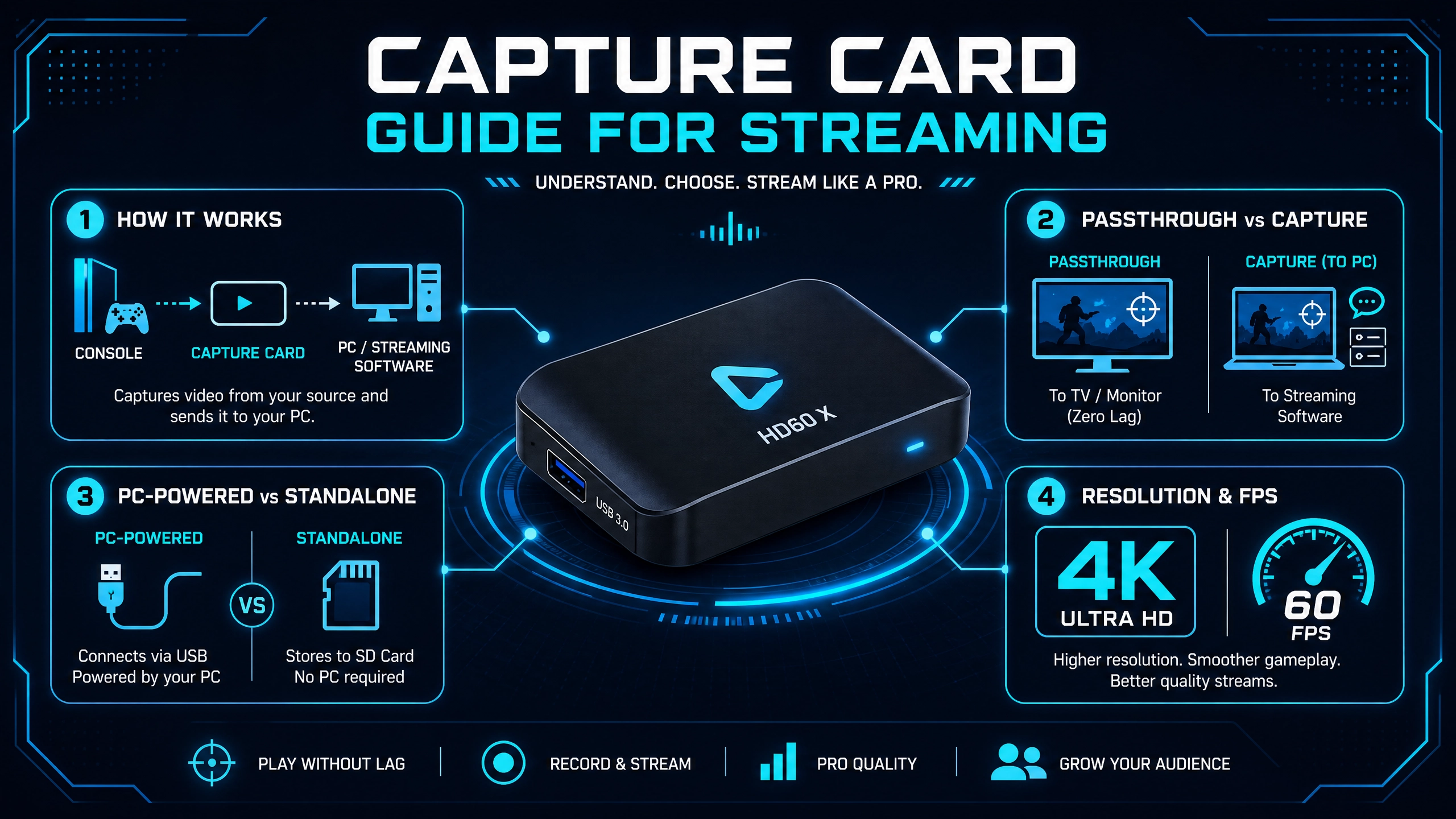
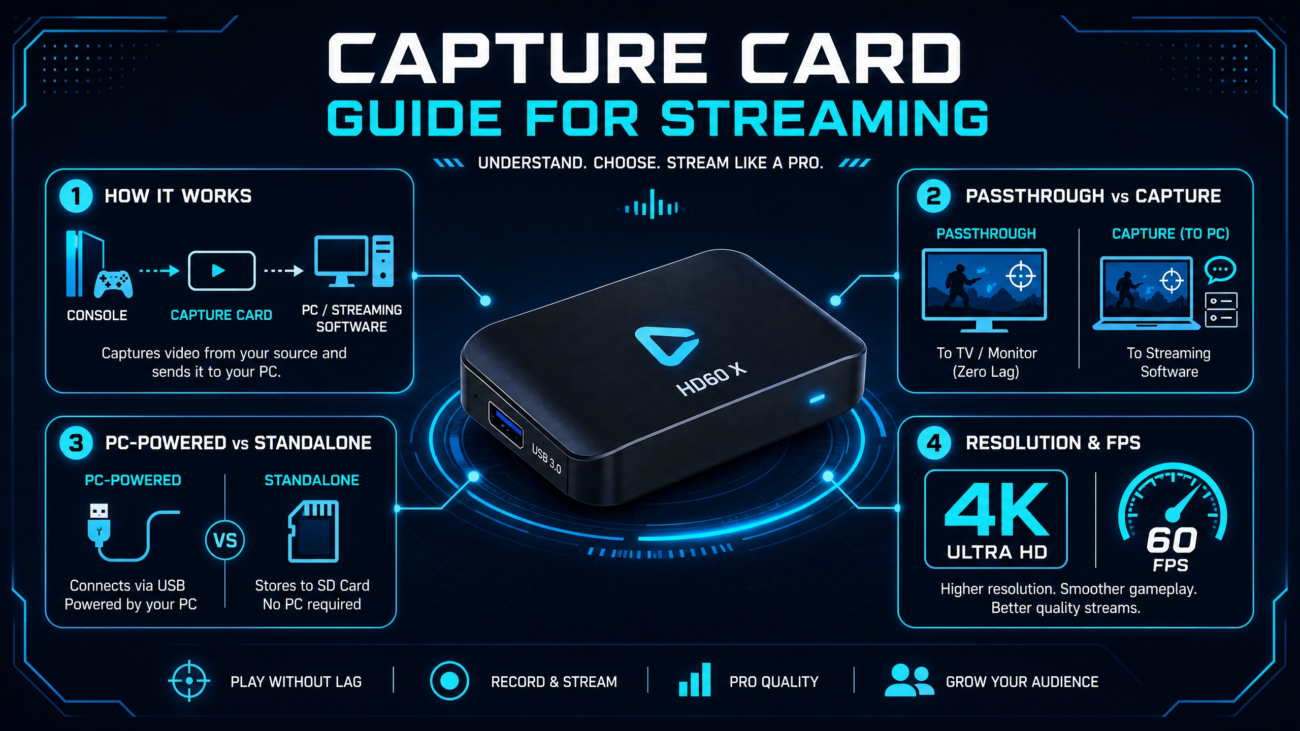
A capture card transfers video signal from one device to another.
For example:
- Your console sends video through HDMI.
- The capture card receives that signal.
- The card sends the video to your PC.
- Streaming software like OBS captures it.
This allows you to:
- Stream gameplay live.
- Record gameplay footage.
- Add facecams and overlays.
- Control audio sources.
- Manage scenes professionally.
Without a capture card, consoles are limited to their built-in streaming features, which may not be the better choice for those seeking advanced features.
A capture card gives your PC control over the entire production.
Understanding Passthrough vs Capture Resolution
This is one of the most misunderstood parts of shopping for a capture card.
The two numbers shown on product pages are usually:
Passthrough resolution
This is the signal sent to your TV or monitor while you play.
Example:
4K at 120Hz passthrough
This means your gameplay experience remains unchanged.
Capture resolution
This is the video being sent to your computer for recording or streaming.
Example:
1080p at 60fps capture
This does not mean quality is reduced while you play.
Most streaming platforms still use 1080p60 as a practical standard, so this setup works perfectly for many users.
Standalone Capture Cards vs PC-Powered Capture Cards
There are two main categories.
PC-powered capture cards
These connect directly to your computer through:
- USB
- PCIe
The computer handles encoding and streaming.
For most gamers and content creators, this is usually the simplest option.
Standalone capture cards
These record directly to:
- SD cards
- External storage
- USB drives
They can work without a computer connected.
These are more common in advanced recording workflows and production environments.
Features That Matter Before Buying
Some specifications affect real-world use much more than others.
Passthrough Support
Modern consoles can output:
- 4K
- High refresh rates
- HDR content
For PS5 and Xbox Series X users, 4K passthrough is worth considering.
Players using high-refresh displays may also benefit from 120Hz support.
Capture Quality
Typical needs look like this:
Streaming: 1080p60 is usually sufficient.
Content creation and editing: 2K or 4K capture provides more flexibility.
Latency
Low latency is essential.
Any noticeable delay between controller input and screen response negatively affects gameplay.
Most quality capture cards aim for near-zero passthrough latency.
USB vs PCIe
USB capture cards
- Plug-and-play setup
- Portable
- Easier installation
PCIe capture cards
- Higher bandwidth
- Better for advanced workflows
- Common in production environments
Most home setups work perfectly well with USB.
Software Compatibility
Good capture cards should work smoothly with software like:
- OBS
- Streamlabs
- XSplit
Compatibility matters more than many buyers expect.
Simple setup often creates a better experience than extra features that add complexity.
Which Setup Matches Your Needs?
Different users benefit from different types of capture devices.
Console Streamers
If you’re streaming directly from:
- PS5
- Xbox Series X
- Nintendo Switch
A USB capture card with:
- 4K passthrough
- 1080p60 capture
usually covers everything needed.
Content Creators Recording for Editing
If your focus is:
- YouTube videos
- Highlight content
- Post-production editing
Higher capture resolutions can provide more flexibility later.
Production Teams and Multi-Source Setups
More advanced environments may involve:
- Cameras
- Presentation systems
- Multiple inputs
- Live switching
Professional setups often benefit from:
- SDI support
- Multi-channel capture
- PCIe workflows
Do You Need a Capture Card for a Gaming PC?
Not always.
If you game and stream from the same PC:
- OBS can capture gameplay directly.
- Your GPU handles encoding, ensuring optimal image quality.
- No additional capture hardware is required.
Capture cards become useful when:
- Streaming from a console
- Using a separate streaming PC
- Capturing external cameras or devices
What Else Improves a Streaming Setup?
A capture card handles video input, but the complete experience usually includes other equipment.
Consider adding:
- A decent streaming microphone—audio quality matters more than most people realise
- A webcam or camera for facecam—Yaya’s USB cameras section has options at different price points
- Lighting—a ring light or desk light behind your monitor makes a visible difference to facecam quality. The lighting section at Yaya covers the basics
- Optionally, a Stream Deck for scene switching and stream management without touching your keyboard mid-game
Video quality matters, but viewers often notice audio quality first.
Frequently Asked Questions
Can I stream a PS5 without a capture card?
Yes. PS5 includes built-in streaming tools, but a capture card provides greater control and customization.
Is 4K capture necessary?
Not always. Many creators stream successfully at 1080p60. Higher resolutions become useful for editing and future flexibility.
Can I use a capture card with OBS?
Yes. Most modern capture cards integrate directly with OBS.
Do capture cards reduce gaming performance?
No. The capture process happens separately and should not affect gameplay when using proper passthrough.
Conclusion
Choosing a capture card becomes much easier once you focus on how you actually plan to use it.
For many streamers, a simple USB capture card with strong passthrough support covers everything needed.
For creators recording high-quality footage or production teams managing multiple sources, more advanced options may make sense.
The goal is not buying the most expensive hardware.
It’s choosing equipment that fits the workflow you already have.