





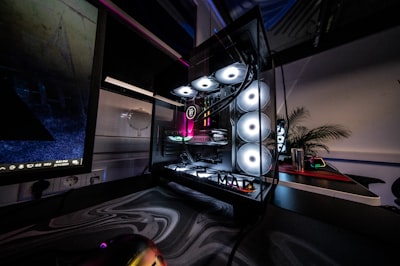
RGB lighting has evolved from a simple visual add-on into a core part of modern gaming setups. In 2026, the focus is no longer just on color. It is about creating atmosphere, improving visual comfort, and building a space that feels cohesive and intentional. A well-lit setup can make even a compact room feel more immersive. With the right placement and balance, RGB lighting enhances both the function and the overall experience of a gaming space.
Why RGB Lighting Matters More Now
Gaming spaces today are designed to be both functional and visually refined. Lighting plays a key role in achieving that balance. Instead of relying on a single light source, modern setups use layered lighting to shape how the space feels throughout the day. RGB lighting helps make smaller rooms feel more open by using indirect light. It adds depth without introducing clutter and allows users to create a consistent visual identity across the entire setup. It also improves the overall experience without requiring changes to core hardware.
1. Back-of-Desk LED Glow (The Foundation)
Back-of-desk lighting is often the starting point for any RGB setup. LED strips placed behind the desk create a soft glow that reflects onto the wall, reducing harsh contrast and making the setup feel more complete. This approach works because the light is indirect. It adds depth behind the desk, reduces reliance on overhead lighting, and improves comfort during longer sessions. When installed correctly, the light source remains hidden while the effect stays consistent. browse RGB lighting for gaming setups
2. Monitor Backlighting (Balanced Viewing)
Adding lighting behind a monitor or TV improves how the screen feels during use. Instead of bright, direct lighting, this creates a soft halo around the display that balances the contrast between the screen and its surroundings. This is particularly useful in darker environments. It reduces eye strain and keeps attention focused on the screen without overwhelming the space. In smaller rooms, this simple addition often has a noticeable impact.
3. Vertical Light Bars and Desk Lighting
Vertical lighting elements introduce structure without taking up desk space. They provide a clean and modern look while offering consistent ambient light. When placed on both sides of a desk, they create symmetry. Behind monitors, they add depth. In corners, they extend lighting beyond the desk and help define the room. Their flexibility makes them one of the more adaptable lighting options.
4. Under-Desk Lighting (Floating Effect)
Under-desk lighting adds a subtle layer that changes how the setup feels. By reflecting light onto the floor, it creates a floating effect that makes the desk appear slightly elevated. This works best in low-light environments or setups that already use RGB. The effect should remain soft, so keeping brightness at a moderate level is important to maintain a clean look.
5. Wall Lighting Patterns
Wall-mounted lighting adds a visual focal point beyond the desk. Instead of leaving walls empty, geometric panels or modular lighting systems can introduce shape and structure. These designs are often used to create a more expressive setup. They allow for customization in both layout and color while also improving how the space appears in photos or videos.
6. Keep Color Combinations Consistent
One of the most common issues in RGB setups is using too many colors at once. A more effective approach is to limit the palette and keep combinations intentional. Using one primary color with a subtle accent usually creates a more refined result. This keeps the setup visually balanced and avoids the cluttered look that can come from excessive variation.
7. Extend Lighting Beyond the Desk
A complete setup considers the entire room, not just the desk area. Extending lighting to shelves, bed frames, or ceiling edges helps create a more immersive environment. This does not require adding many new elements. Instead, it is about placing light in areas that support the overall layout and improve how the room feels as a whole.
8. Smart Lighting Control
Modern RGB systems allow lighting to adapt to different situations. With app-based controls, users can adjust brightness, color, and timing without changing the physical setup. This flexibility makes it easier to switch between gaming, working, and relaxing modes. It also helps maintain consistency without needing constant manual adjustments.
9. Balance Lighting with Minimalism
More lighting does not always lead to a better setup. In many cases, restraint creates a stronger result. Keeping surfaces clean and allowing lighting to enhance rather than dominate the space leads to a more comfortable and visually appealing environment. The goal is to support the setup, not overwhelm it.
10. Build Lighting in Layers
Layered lighting creates depth and structure. A simple way to approach this is by thinking in three parts. The base layer provides a soft glow, usually from back-of-desk lighting. The focus layer improves visibility through monitor and under-desk lighting. The ambient layer extends into the room with wall lighting or indirect accents. When these layers work together, the setup feels more complete without becoming overly complex.
Final Thoughts
RGB lighting in 2026 is less about intensity and more about intention. Well-designed setups focus on placement, balance, and consistency rather than simply adding more light. A thoughtful approach improves both appearance and usability. It creates a space that feels comfortable, visually clear, and well put together. shop RGB lighting for gaming rooms
Frequently Asked Questions
What are the benefits of RGB lights in a gaming room?
RGB lights create an immersive experience by matching game themes, reduce eye strain during long sessions, and enhance ambiance with customizable colors and brightness.
Are RGB lights energy efficient?
Yes, RGB LED lights are energy efficient, consuming less power than traditional options while providing vibrant colors.
What colors work best for gaming?
Cool blues for focus in competitive games, warm colors for casual play, and customizable RGB for immersion.